Neon Cube Lab — Interactive 3D Rubic
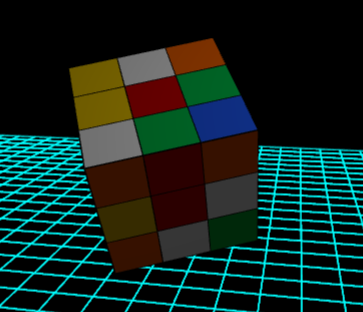
A high-fidelity 3D simulation environment featuring real-time planar reflections, physically-based rendering (PBR), and interactive sector analysis of geometric forms.
Click here to access.
1. The Core Engine
The logic is driven by Three.js, a high-level JavaScript library that handles the 3D scene graph.
- Group Hierarchy: The simulation uses a
THREE.Group()to consolidate 26 individual "sub-cubes." This allows for global transformations (rotation and levitation) while maintaining the independent identity of each piece for interaction. - Object Lifecycle: The engine procedurally generates the Rubik's cube using nested loops to position pieces at coordinates $(x, y, z)$ within a $(-1, 1)$ range.
- Integrity Watchdog: A security "heartbeat" script (
_chk_sys) runs every 2500ms. It acts as a background monitor that checks if the attribution links are modified or hidden. If it detects tampering, it trips a safety flag (_sys_active = false), causing the engine to clear the buffer and display a red screen.
2. Rendering Technology
The project utilizes Physically Based Rendering (PBR) and real-time planar reflections to achieve a "neon" high-fidelity look.
- PBR Materials: It uses
MeshPhysicalMaterial, which simulates realistic light interaction. Key properties used include:- Clearcoat: Adds a secondary reflective layer (like automotive paint).
- Metalness/Roughness: Defined to create a shiny, high-gloss plastic finish.
- Planar Reflections: A
Reflectoraddon is used for the floor. Unlike standard materials, this creates a second camera pass to render a mirrored version of the scene on the $XZ$ plane. - Additive Blending: The neon grid uses
AdditiveBlending, which mathematically adds color values together, causing the cyan lines to "glow" against the black background.
3. Mathematical Tools
The simulation relies on Vector Calculus and Raycasting for spatial logic.
- Raycasting: To detect which side of the cube the user clicked, the engine projects a mathematical ray from the 2D mouse coordinates through the 3D camera frustum. It identifies the specific
materialIndexof the face intersected to pull the correct color name. - Trigonometric Oscillations: The "levitation" effect is calculated using a Sine wave:

- Euler Rotations: Initial sub-cube orientations are randomized using right-angle increments pi/2, ensuring the cube looks "scrambled" while remaining aligned with the 3D grid.
4. Front-End Environment
The application is built as a Modern ES Module (ESM) web page.
- Import Maps: The code uses a
<script type="importmap">. This is a modern browser feature that allows for clean, readable imports (e.g.,import * from 'three') without needing a build tool like Webpack or Vite. - Dynamic HUD: The UI uses an HTML/CSS overlay (
#ui-layer) that stays pinned to the screen regardless of the 3D camera's movement. It utilizesbackdrop-filter: blur()for a "glassmorphism" aesthetic. - Adaptive Viewport: The environment listens for window resizing to update the
PerspectiveCameraaspect ratio and theWebGLRenderersize, preventing the 3D scene from stretching.