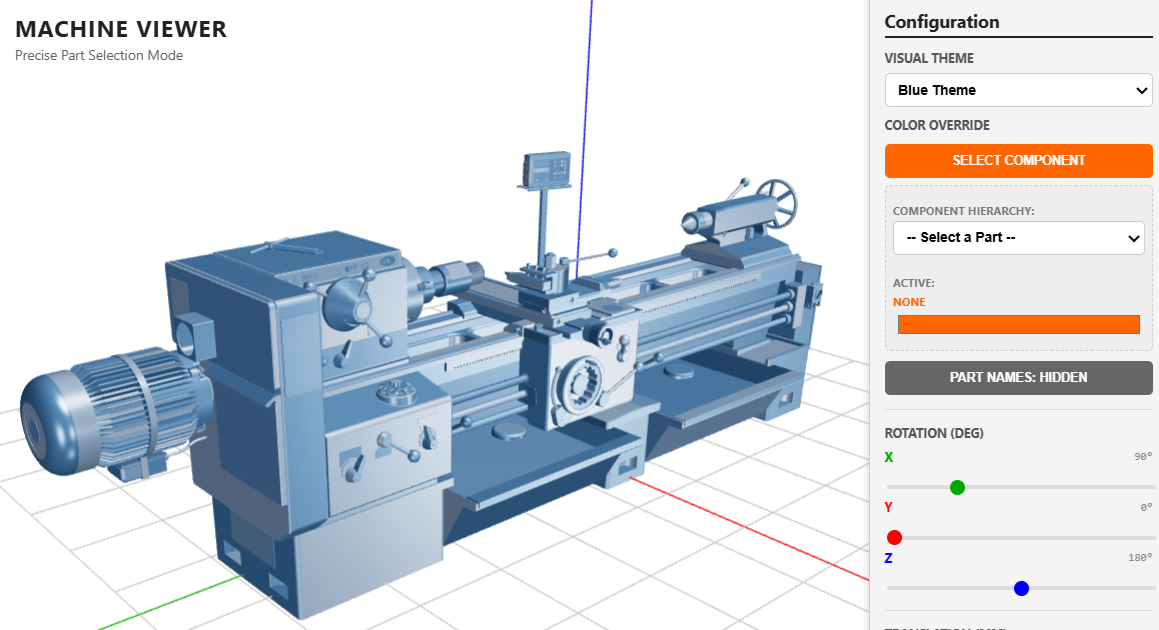
A browser viewer for inspecting machine tools the way CNC students need to inspect them: rotate, identify the axes, understand the motion.
I teach CNC machining. Part of the curriculum is the machine itself — how a lathe holds and rotates the workpiece, how a milling centre moves its tool through a programmed path, how a five-axis machine combines linear and rotary motion to reach surfaces that no three-axis machine could. The textbook describes these machines. The diagrams show them in two dimensions. Neither makes the actual operation of the machine visible — the relationship between the control axes a student programs in G-code and the physical motion that happens at the cutting tool.
Commercial CAD software can show you the assembly, but it costs a license, a heavy installation, and a learning curve none of which a first-year manufacturing student is equipped to handle just to look at a machine.
This is the CNC viewer I built for the gap between the textbook and the workshop.
Try it here — runs in any modern browser, accepts standard CAD-exported model formats.
Who this is for
The audience is anyone learning CNC machine operation. First-year manufacturing students seeing the inside of a lathe for the first time. Operators-in-training trying to understand the relationship between control axes and machine motion. Anyone writing G-code for a machine they haven't physically stood in front of. Lecturers preparing visual aids. Engineers reviewing a vendor's machine before purchase.
How it works
You drop a model file from your CAD package into the browser. The viewer loads it, scales it to fit the viewport regardless of original CAD scale, and lights it with a three-point setup so the metal parts read as metal. Click on any component and it highlights — useful for identifying the headstock, the tailstock, the cross-slide, the tool post, the spindle, the table, the slides.
Use the mouse or touch to orbit, pan, and zoom. Switch between colour themes to emphasise different subsystems of the machine. Standard machining-axis conventions (green X, red Y, blue Z) are built in, so the axis labels in the viewer match what the student will see on every real CNC controller's control panel.
No installer. No license. No upload — the file never leaves the browser.
The core idea
The principle is that seeing a machine and operating a machine require different mental models, and the second one builds on the first. A student writing their first G-code program needs to know which axis the spindle moves along, which axis the table moves along, where the work coordinate system's origin sits, and what the work envelope looks like. None of that is obvious from a textbook diagram. All of it becomes obvious from a 3D model the student can rotate, zoom into, and click on.
The viewer is built for that first level of understanding — the machine as an assembly of named, oriented parts. Once a student knows what each component is, which axis controls which motion, and how the kinematic chain of the machine fits together, the operational concepts (G-code coordinates, tool paths, work offsets, machine zero, work zero) sit on solid ground. Without that foundation, the operational concepts float free and the student is reduced to memorising rules they don't understand.
The colour conventions matter. Green X, red Y, blue Z is the standard across the industry, so students see the same axis colours in the viewer that they'll see in every real machine they touch. The lighting is bright and contrast-heavy because a teaching aid needs every part to be readable, not artistically obscured.
The moment the machine becomes a system
The reason for building this is a moment that happens when a student finally sees what they've been reading about. They've memorised the parts of a lathe. They've passed the quiz on the headstock-tailstock-carriage-cross-slide arrangement. They've written their first G-code program with G01 X10 Z5 in it. Then they rotate the model, look down the bed of the lathe, and understand for the first time that the X axis moves the cross-slide across the workpiece while the Z axis moves the carriage along the bed. The G-code stops being syntax and starts being instructions to a physical machine they can picture.
That structural understanding — control axis to physical motion — is what CNC operators carry into the workshop. The viewer is built to make it arrive before they get there.
What this is
A free, browser-based CAD viewer purpose-built for inspecting CNC machines as teaching aids. Drop in a model, rotate it, understand the axes, close the tab. No license, no installer, no project file. The right level of detail for the right step in the curriculum, sized to bridge the gap between the textbook diagram and the real machine on the shop floor.
Coming next
A tutorial article and YouTube video are in production: how this viewer was built with AI coding agents, including the model loading pipeline, the lighting setup, and the axis-colour conventions that match real CNC controllers. Subscribe for when it ships.