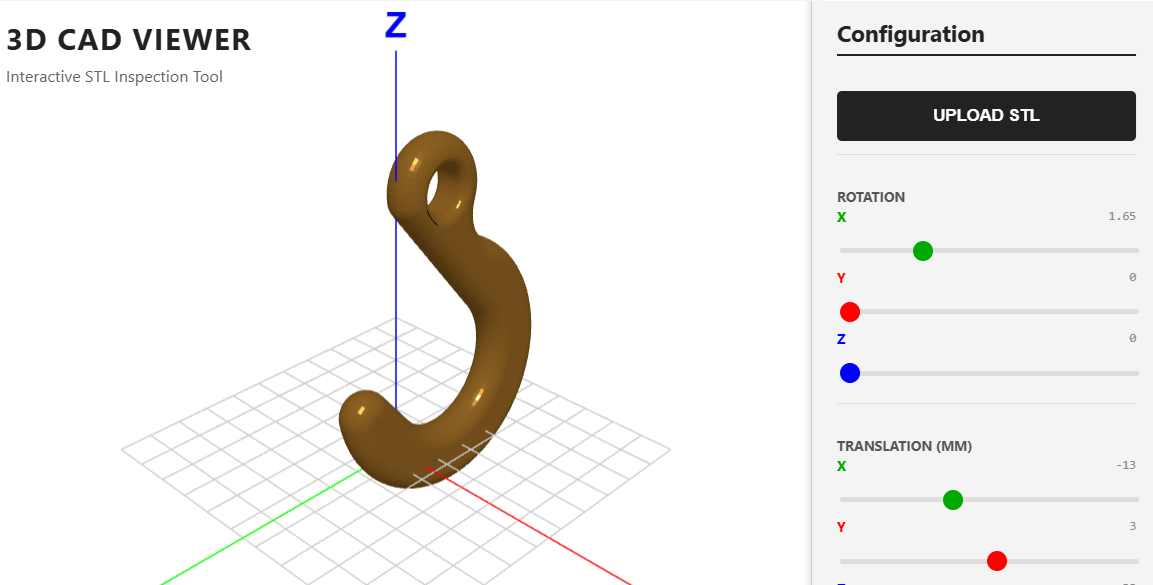
A no-install browser viewer for STL files — the predecessor to the CNC machine viewer published months later.
This was the first viewer I built. Drop an STL file in, see the model, rotate it, inspect it. No installer, no account, no upload to a server. Just a viewer.
It does one specific thing: parse STL geometry (binary or ASCII), render it with reasonable lighting, give you controls to orbit and zoom. That's it. No mesh editing. No measurement. No annotation. Just look at this model. Click here to access.
What it is
A minimal STL viewer that runs entirely in the browser. Files never leave your machine. The model loads, the camera frames it automatically regardless of scale, and you can rotate it to inspect from any angle. The grid and axis indicators help you understand the model's orientation and dimensions.
What stayed with me
The realisation that a focused viewer is a tool, not a feature. Most CAD packages include a viewer as part of the larger application. Pulling the viewer out, making it the whole product, turned out to be valuable in a way the bundled version isn't — students can use it without a license, engineers can use it for quick second opinions, and the lightweight footprint makes it suitable for the embedded-in-an-LMS use case.
The CAD viewer became the foundation for the CNC machine viewer that followed. The STL parsing, the auto-framing, the lighting setup — all of those got reused. Sometimes a small experiment is the prototype for the focused tool that comes later.
Part of the early experiments — building the foundation for the CNC-specific viewer that grew from it.