Interactive conservative energy simulation
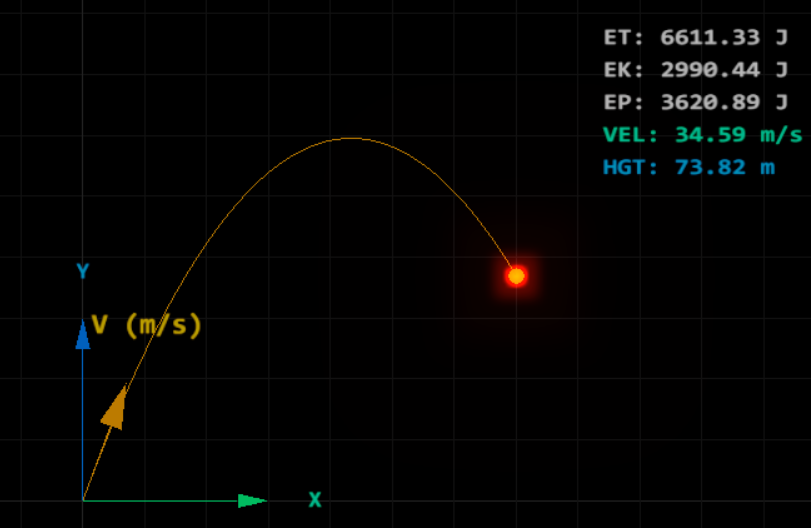
Interactive 3D simulations and visual deep-dives into the laws of motion, energy dynamics, and projectile physics.
Click here to access.
1. The Core Engine
The logic is built upon the Three.js framework, but the simulation "brain" is a custom Physics Integration Engine.
- Time-Step Integration: Unlike simple animations that move objects by a fixed amount per frame, this engine calculates the exact position and velocity of the projectile based on
performance.now(). This ensures that even if the frame rate drops, the physics remain accurate to real-world time. - State Machine: The engine manages four primary states: Setup (calculating trajectories), Launch (active simulation), Paused (freezing time via
totalPausedTimecalculations), and Result (tabulating peak energies). - Integrity Watchdog: A background security loop (
verifyIntegrity) runs every 2000ms. It acts as a "Guardian" for the application's environment, reloading the page if the DOM attribution elements are tampered with or hidden.
2. Rendering Technology
The project utilizes a Post-Processing WebGL Stack to achieve a high-tech "Glow" or "Neon" effect.
- Effect Composer: Rather than rendering directly to the screen, the engine renders to a buffer managed by an
EffectComposer. - Unreal Bloom Pass: This specific pass simulates the way high-intensity light bleeds into surrounding pixels. It targets the projectile's emissive material (intensity set to 5) to create a glowing "tracer" effect as it flies.
- Orthographic Projection: The lab uses an
OrthographicCamera. This removes perspective foreshortening, ensuring that the 2D physics grid remains geometrically perfect for measurement, regardless of the projectile's distance from the camera. - Dynamic Canvas Textures: The HUDs (both the overlay and the floating
liveHUD) are rendered using a "Canvas-within-a-Texture" approach. JavaScript draws text onto an off-screen HTML5 Canvas, which is then mapped onto a 3D Sprite in real-time.
3. Mathematical Tools
The simulation is a direct implementation of Classical Kinematics and Conservation of Energy formulas.
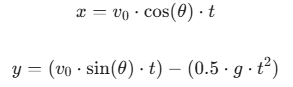
- Kinematic Equations: The engine solves for position at time t using:
- Energy Calculations: Every frame, the engine calculates:

- Vector Trigonometry: It uses
Math.sinandMath.costo decompose the initial velocity into its components and uses the Pythagorean theorem to find the instantaneous speed.
4. Front-End Environment
The environment is a Hybrid UI/3D Workspace that blends traditional web controls with a spatial 3D viewport.
- lil-gui Integration: The environment includes a floating "control deck" (the GUI). This allows users to manipulate the simulation's "Environment Constants" (mass, gravity, velocity) in real-time without refreshing the page.
- Responsive CSS Overlays: The
overlaydiv usespointer-events: none, allowing the user to view data while still interacting with the 3D scene (panning and clicking) behind the text. - Modular Import Maps: The project utilizes modern browser-native ES Modules via an
importmap. This allows the environment to load Three.js and its high-end post-processing add-ons directly from CDNs without needing a complex build system like Vite or Webpack.