An Interactive Orbital Shape Playground
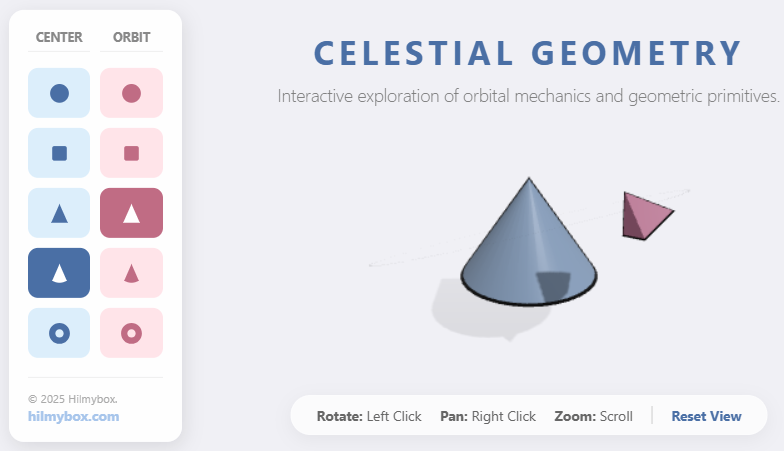
Step into a minimalist digital laboratory where geometry and orbital mechanics collide. Geometric Harmonics is a real-time 3D simulation that allows you to choreograph the relationship between a central mass and its satellite through a sleek, icon-driven dashboard.
Click here to access.
1. The Core Engine
The core engine of this application is Three.js, an abstraction layer built on top of WebGL.
- Scene Management: It uses
THREE.Scene()as the primary container where all objects, lights, and cameras are managed. - Animation Loop: The
animate()function serves as the engine's "heartbeat," usingrequestAnimationFrameto update the rotation of the shapes and the orbit pivot roughly 60 times per second. - Object Hierarchy: The engine uses a "Pivot" logic (an
Object3Dacting as a rig). Instead of calculating complex movement for the small shape, the engine rotates the pivot, and the shape—being a child of that pivot—moves in a perfect circle.
2. Rendering Technology
The rendering is handled via WebGL (Web Graphics Library) through the THREE.WebGLRenderer.
- Lighting & Shadows: It utilizes
PCFSoftShadowMap, which calculates soft, realistic shadows cast from the shapes onto an invisible floor plane. - Post-Processing/Visuals: * Antialiasing: Set to
trueto smooth out jagged edges.- Fog: A
THREE.Fogobject is used to blend the shapes into the background color as they move further from the camera. - Materials: It renders using
MeshStandardMaterial, which reacts to theAmbientLightandDirectionalLightto simulate depth and "pastel" textures.
- Fog: A
3. Mathematical Tools
The application relies on several geometric and trigonometric mathematical concepts:
- Coordinate Systems: Uses 3D Cartesian coordinates (x, y, z) for positioning.
- Trigonometric Constants: Uses pi number (as
Math.PI) for rotations (e.g.,Math.PI / 2to lay the floor and orbit path flat). - Angle Conversion: Uses
THREE.MathUtils.degToRad(23.5)to convert human-readable degrees into Radians, which the computer requires for the orbital inclination. - Transformation Matrices: Behind the scenes,
multiplyScalar(scale)is used to calculate the size of the black "outlines" relative to the original shape's geometry.
4. Front-End Environment
The environment is a standard Modern Web Browser (HTML5/CSS3/ES6+).
- UI/UX Layer: The "Dashboard" is built using CSS Grid for the button layout and SVG (Scalable Vector Graphics) for the icons inside the buttons.
- Module System: It uses
type="module"and animportmap. This allows the browser to fetch the Three.js library directly from a CDN (Content Delivery Network) without needing a complex build tool like Webpack or Vite. - Responsive Design: A
window.resizeevent listener ensures the "Camera Aspect Ratio" and "Renderer Size" update instantly if the user changes their browser window size.