The Digital Nexus
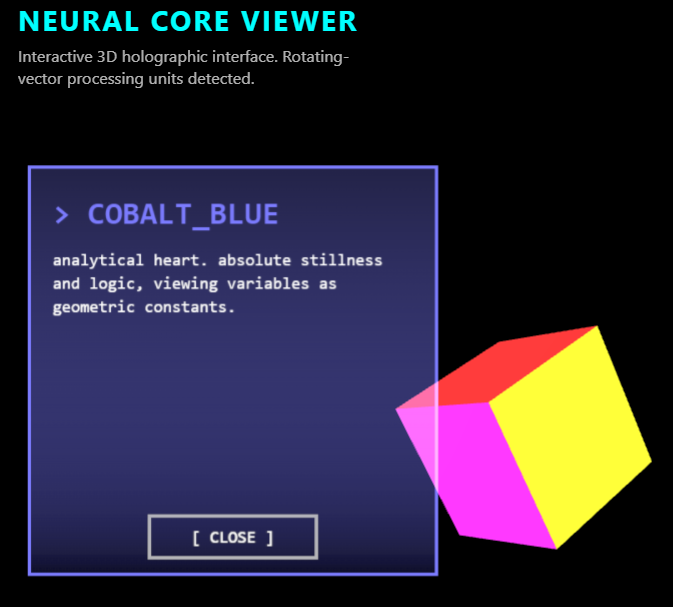
Decoding the future of interactive systems. A curated repository of data streams, 3D experiments, and the logic behind the code.
Click here to access.
1. The Core Engine
The logic is driven by a custom State Management and Event System built on top of Three.js.
- Asynchronous Content Delivery: The "decoding" effect is managed by a
setInterval-driven typewriter engine. It feeds substrings of data into a 2D canvas context, which is then re-uploaded to the GPU as a dynamic texture. - Animation Orchestration: The engine uses GSAP (GreenSock Animation Platform) to handle the smooth, non-linear transitions between rotation states. When a user clicks a face, GSAP interpolates the cube's rotation coordinates to align perfectly with the "camera" view.
- Integrity Watchdog: A background security loop monitors the DOM every 3000ms. It verifies the presence of the attribution footer and the specific text content. If tampering is detected (e.g., removing the backlink), it triggers a
location.reload()to protect the developer's intellectual property.
2. Rendering Technology
The visualization utilizes WebGL with a focus on Holographic Emissive Shading.
- PBR Materials with High Emission: The cube uses
MeshStandardMaterialwithmetalness: 0.8andemissiveIntensity: 1.2. This causes the surfaces to appear as if they are self-illuminated, a hallmark of holographic UI design. - Canvas-to-Texture Pipeline: The information panel is not a standard HTML element. It is a
PlaneGeometrythat uses aCanvasTexture. This allows the text to exist within the 3D scene, subject to depth and lighting. - Additive Blending: The text plane uses
THREE.AdditiveBlending, which mathematically adds the pixel values of the texture to the background. This creates a "light-on-light" transparency effect that mimics a physical hologram projector.
3. Mathematical Tools
The precision of the interactive elements relies on Vector Calculus and Coordinate Transformation.
- Raycasting and UV Mapping: To detect which specific side of the cube was clicked, the engine uses
THREE.Raycaster. It analyzes thefaceIndexof the hit—since a cube has 12 triangular faces (2 per side), the mathMath.floor(faceIndex / 2)is used to map the click to the correct metadata. - Billboard Geometry (Quaternions): The text panel needs to follow the floating cube but always face the viewer. This is achieved via Billboarding:
textPlane.quaternion.copy(camera.quaternion)
This copies the camera's orientation to the plane, ensuring it is always perpendicular to the viewer's line of sight.
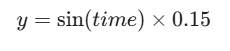
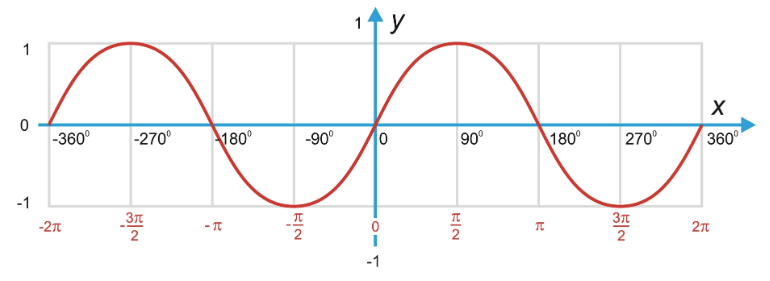
- Harmonic Oscillation: The floating effect is calculated using a Sine Wave over the time delta:
4. Front-End Environment
The environment is a Hybrid UI ecosystem that blends raw HTML/CSS with modular JavaScript.
- Modular Import Maps: The code uses a
<script type="importmap">, a modern browser standard that allows the code to use cleanimportstatements (e.g.,import * as THREE from 'three') without a complex build tool like Webpack. - Responsive Viewport Handling: The environment listens for window resizing to update the
PerspectiveCameraaspect ratio and theWebGLRenderersize, preventing the 3D objects from appearing stretched or squashed. - Typeface Rendering Engine: A custom
wrapTextfunction is used within the 2D Canvas context. This is necessary because the Canvas API does not natively support line breaks, requiring a mathematical calculation of word widths against the maximum panel width (mw = 420).