Interactive Geometry: Projection View
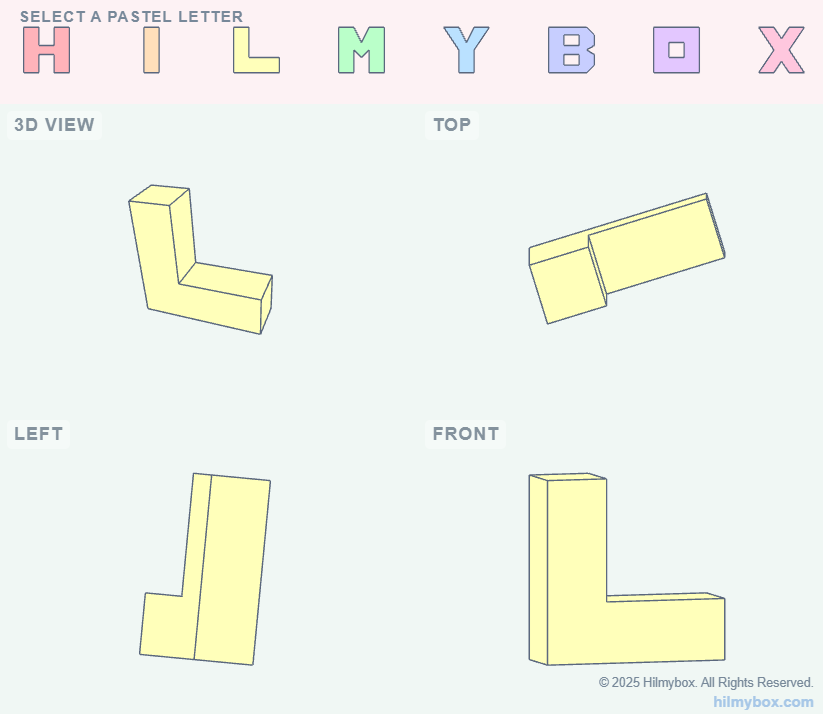
This project explores the intersection of minimalist design and browser-based 3D rendering by transforming the name "HILMYBOX" into a tactile, interactive experience.
Click here to access.
1. The Core Engine: Three.js
The most critical component is Three.js (imported via the unpkg CDN). It is a cross-browser JavaScript library and Application Programming Interface (API) used to create and display animated 3D computer graphics in a web browser using WebGL.
- ExtrudeGeometry: This tool takes the 2D shapes (like the letters H, I, L) and "pushes" them into the third dimension, giving them depth.
- Scene Management: The code maintains two separate scenes—one for the top menu navigation and one for the main quad-view display.
- Camera Systems: It utilizes both
PerspectiveCamera(for the 3D view to show depth/foreshortening) andOrthographicCamera(for the Top, Left, and Front views to show exact proportions without perspective distortion).
2. Rendering Technology: WebGL
While Three.js is the "engine," WebGL (Web Graphics Library) is the underlying low-level system.
- The
THREE.WebGLRendererutilizes the computer's GPU (Graphics Processing Unit) to perform the complex math required to calculate light, shadows, and vertex positions in real-time. - The Viewport & Scissor Test: The code uses
renderer.setScissorTest(true). This is a specific WebGL technique that allows the developer to divide a single canvas into multiple sections (the "quad-view"), rendering a different camera view into each specific rectangular area.
3. Mathematical Tools: Vector Graphics & Paths
To create the letters without external 3D models (like .obj or .stl files), the code uses Path Geometry:
- THREE.Shape: The letters are defined using
moveToandlineTocommands, similar to how SVG (Scalable Vector Graphics) works. - Holes: For letters like 'B' and 'O', the code uses
s.holes.push(h1), which performs a boolean subtraction to "punch out" the center of the geometry.
4. Front-End Environment
The "Dashboard" look is achieved through standard web tools:
- CSS Flexbox: Used in the
bodyand#_sys_ftrto align the UI elements and the footer. - Import Maps: A modern browser feature (seen in the
<script type="importmap">section) that allows the code to use cleanimport * from 'three'syntax instead of long URL strings. - Event Listeners: The interactive rotation is handled by monitoring
mousedownandmousemoveevents, translating 2D mouse coordinates into 3D rotation values.