Cube Disintegration: A 3D Physics Simulation Lab
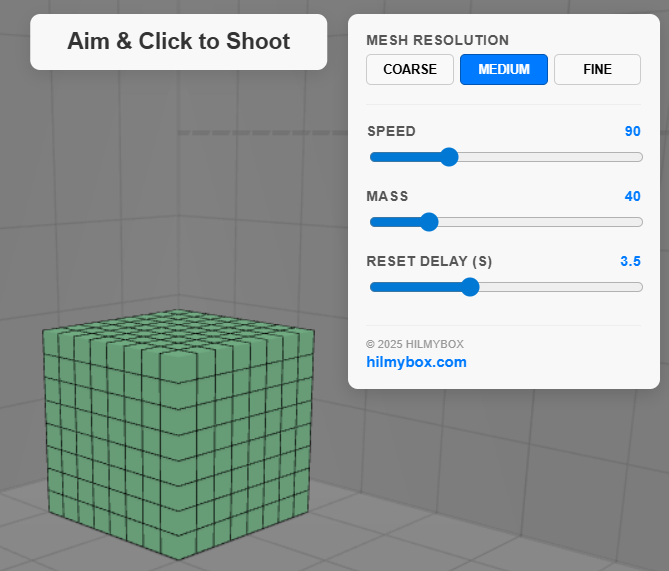
Experience the satisfying mechanics of high-velocity destruction with this interactive Three.js and Cannon-es simulation. Adjust mesh resolution, projectile mass, and speed to explore how a voxelized cube reacts to high-impact forces in a real-time physics environment. Perfect for stress testing browser performance and exploring 3D collision dynamics.
Click here to access.
1. The Core Engine
The logic is powered by a dual-engine setup that separates visual representation from physical behavior.
- Physics Integration (CANNON-es): This is the "brain" of the simulation. It handles rigid-body dynamics, gravity, and collision detection. The world is initialized with a
SAPBroadphase, an optimization algorithm that quickly prunes pairs of objects that are too far apart to collide, which is essential when managing over 500 active chunks. - State Synchronization: Every frame, the engine performs a "world step" (calculating new positions at 60Hz). It then manually copies these mathematical coordinates from the Cannon.js bodies over to the Three.js meshes so the user can see the results.
- Broadphase Collision:
2. Rendering Technology
The visuals are handled by Three.js using modern WebGL 2.0 capabilities.
- Shadow Mapping (PCFSoft): The lab uses
PCFSoftShadowMapto provide realistic, soft-edged shadows. This adds depth to the voxels, making it easier for the user to perceive the 3D volume of the cube. - Outline Rendering (Inverted Hull): Each voxel has an "outline" effect created by a
THREE.BackSidematerial. The mesh is cloned, scaled slightly larger, and colored black; by rendering only the back faces, it creates a crisp border that makes the voxels look like stylized comic-book objects. - Fog & Lighting: A
Fogeffect is applied to the background to provide a sense of scale and distance, preventing the floor planes from appearing to end abruptly.
3. Mathematical Tools
The simulation relies on 3D geometry and vector math to bridge the gap between user input and 3D space.
- Raycasting: When you click the screen, the engine uses Raycasting to project a 3D line from the 2D mouse position through the camera lens into the scene.
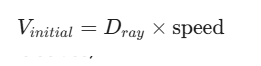
- Euclidean Vector Multiplication: To launch the projectile, the engine takes the normalized direction vector of the ray and multiplies it by the projectileSpeed variable:
- Quaternion Rotation: Since voxels tumble and spin upon impact, the engine uses Quaternions rather than Euler angles (x, y, z) to avoid "Gimbal Lock" and ensure smooth, 360-degree rotation across all axes.
4. Front-End Environment
The environment is a high-performance Single Page Application (SPA) built with modular JavaScript.
- Import Maps: This modern standard allows the browser to resolve dependencies like
threeandcannon-esdirectly from CDNs without a build step (like Vite or Webpack), keeping the code portable and lightweight. - Reactive UI: The control panel uses standard HTML inputs (
range,button) tied to JavaScript event listeners. These listeners dynamically update the "Mesh Resolution" by disposing of old geometry and recalculating the voxel grid. - Integrity Guard: The environment includes a security script that monitors the DOM. If the attribution link to hilmybox.com is hidden or modified via the inspector, the
_sys_activeflag is tripped, which clears the 3D scene and halts the physics world to protect intellectual property.