Architectural Configurator: Interactive 3D Interior Design
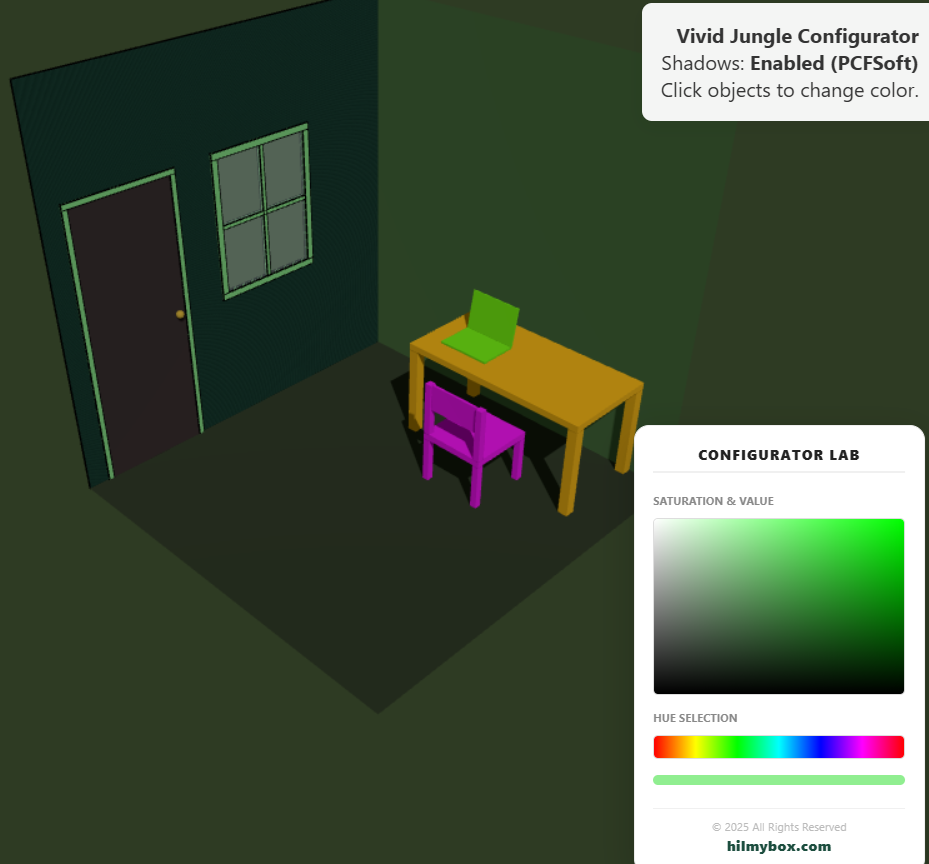
Explore the intersection of architecture and real-time technology with this interactive 3D configurator. Built using Three.js, this lab features an optimized PCFSoft shadow system and a custom HSL color engine. Users can manipulate material properties of furniture and architectural elements in real-time, visualizing how light and shadow interact within a modern workspace environment.
Click here to access.
The provided code represents a high-level Architectural Configurator allowing users to interactively customize the materials and colors of a 3D environment in real-time. It uses a "Vivid Jungle" aesthetic to showcase furniture and spatial layouts.
1. The Core Engine
The application is built on the Three.js library, which acts as the core engine for scene management.
- Scene Graph Management: The engine maintains a hierarchical structure of objects. For example, the "Laptop" and "Window" are built as
THREE.Groupobjects, allowing multiple meshes (the screen, the base, the frame) to be moved or rotated as a single unit. - Buffer Management: To optimize the heavy furniture models (like the chair and table), the engine utilizes
BufferGeometryUtils.mergeGeometries. This merges multiple box geometries into a single mesh, reducing the "draw call" overhead on the GPU. - Integrity System: A custom watchdog script (
_chk_sys) acts as a background "heartbeat." It checks for the existence and visibility of attribution elements every 2500ms, effectively locking the scene if the branding is tampered with.
2. Rendering Technology
The configurator utilizes WebGL 2.0 with a focus on high-fidelity lighting and "Toon-style" stylization.
- Shadow Mapping: It uses
THREE.PCFSoftShadowMap(Percentage Closer Filtering). This technology provides soft, realistic shadows that blur at the edges, which is essential for architectural visualizations to feel grounded. - Edge Outlining: To give the jungle furniture a distinct "concept art" look, the engine applies
THREE.EdgesGeometryandTHREE.LineSegments. This overlays a black wireframe (outline) on top of the solid 3D volumes. - Planar Geometry with Holes: The walls are not simple planes; they are generated using
THREE.Shapeandholes.push(). This allows the engine to mathematically "cut out" windows and doors from a single polygon surface while maintaining clean geometry.
3. Mathematical Tools
The interaction between the 2D user interface and the 3D world relies on Coordinate Transformation and Vector Algebra.
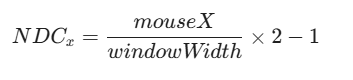
- Raycasting: When a user clicks, the engine projects a mathematical ray from the 2D screen coordinate ($x, y$) into 3D space. It calculates the intersection point using the formula:
- HSV to RGB Conversion: The color picker logic uses HTML5 Canvas to map Hue (0–360°) and Saturation/Value (0–100%) into RGB pixel data. This data is then fed into the Three.js material's
.set()method to update the 3D object's appearance. - Rotation Matrices: The door and laptop hinges are positioned using relative offsets and rotated on a single axis (the X-axis for the laptop, Y-axis for the door), utilizing local coordinate system math rather than global coordinates.
4. Front-End Environment
The environment is a modern, responsive ES Module (ESM) ecosystem.
- Import Maps: The project avoids a complex build step (like Webpack or Vite) by using a
<script type="importmap">. This allows the browser to resolve specific versions of Three.js and its add-ons directly from the Unpkg CDN. - Custom UI Layer: The color picker is built using native HTML5 Canvas 2D. It utilizes
createLinearGradientto generate a hue spectrum and a saturation/value map, allowing for a lightweight, high-performance UI that doesn't rely on external CSS frameworks. - OrbitControls: The environment uses a restricted
OrbitControlsplugin. The "Target" is mathematically locked at (7.5, 2, 7.5), ensuring the camera always orbits the center of the room regardless of how the user pans.