Web-Based CNC Machine Viewer
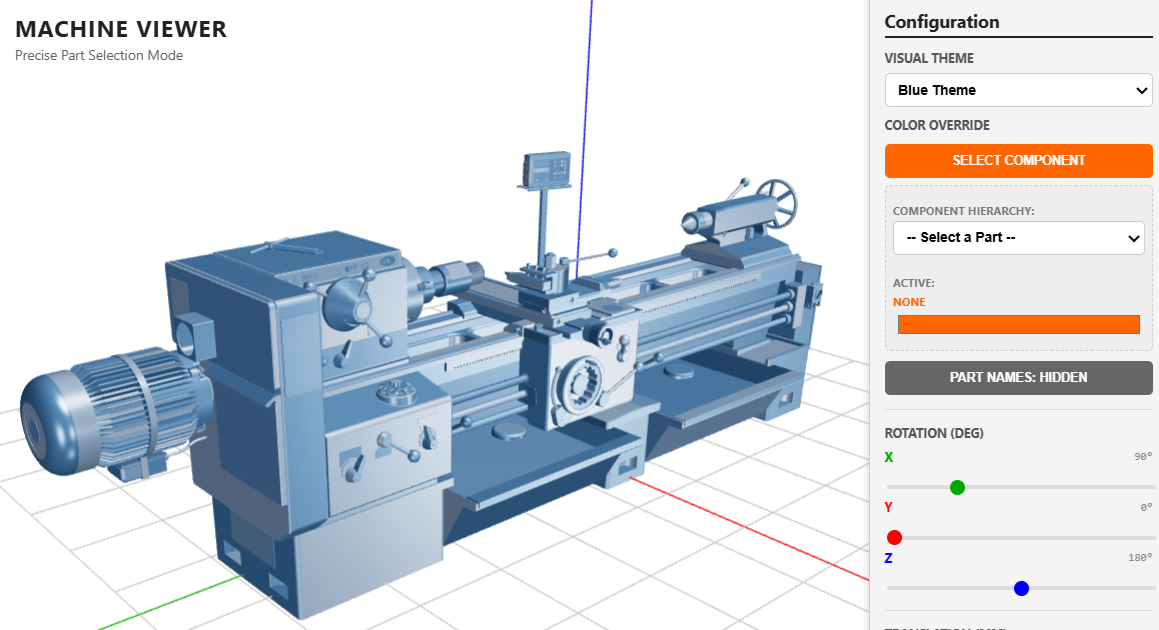
In the era of Industry 4.0, the ability to visualize complex mechanical assemblies directly in the browser is a game-changer. This project showcases a High-Precision CNC Machine Viewer, a lightweight yet powerful tool designed for engineers and designers to inspect machine components. By utilizing modern web technologies, we’ve created a workspace where users can interact with CAD-exported models, select specific parts, and manipulate machine orientation in real-time without the need for heavy local software.
Click here to access.
The Core Engine
The heartbeat of this application is Three.js, a high-level JavaScript library that simplifies the complexities of WebGL. The engine manages several critical systems:
- Scene Management: Coordinates the lights, cameras, and the 3D objects (the Lathe Machine) in a unified coordinate system.
- Asset Loading: Uses the
GLTFLoaderandSTLLoaderto parse binary 3D data into renderable meshes. - Interaction Logic: Implements a
Raycasterto detect mouse clicks in 3D space, allowing for precise part selection and identification. - Environment Mapping: Employs a
PMREMGeneratorto create realistic metallic reflections based on a virtual "Room Environment."
Rendering Technology
To achieve professional-grade visuals, the viewer utilizes a WebGL-based rendering pipeline with several advanced configurations:
- Anti-aliasing: Smooths jagged edges on mechanical parts for a crisp look.
- Tone Mapping: Uses
ACESFilmicToneMappingto simulate the high dynamic range of real-world lighting. - Dynamic Lighting: Combines an
AmbientLightfor soft fill-lighting with aPointLightthat is parented to the camera, ensuring the "tool" being inspected is always illuminated from the user's perspective. - Material Overrides: A custom mapping system allows the renderer to swap original CAD materials with high-visibility themes (Blue, Green, or Orange) on the fly.
Mathematical Tools
Behind every rotation and movement lies a series of mathematical transformations. The application handles:
- Euler Rotations: Converting user degrees into radians for the X, Y, and Z axes using the ZXY rotation order.
- Vector Translation: Moving the model Group through 3D space via coordinate vectors:Pnew= Pold + v
- Bounding Box Calculations: Upon loading a model, the system calculates its size (Box3) to automatically scale and center the machine within the viewport, regardless of its original CAD scale.
- Coordinate Normalization: Mapping 2D mouse coordinates from the screen into the -1 to +1 range required for 3D raycasting.
Front-End Environment
The user interface is built as a split-screen environment, prioritizing the 3D viewport while maintaining a dense control panel:
- The Viewer: A responsive
canvaselement that fills the available screen width. - Configuration Sidebar: A 240px control hub featuring custom-styled HTML5 range inputs, color pickers, and dropdowns.
- State Management: The UI and 3D engine are synced via event listeners; as you move a slider, the mathematical transformation updates the scene, and the "Value" display updates the UI simultaneously.
- CSS Visuals: A dark-themed, industrial aesthetic using
Segoe UIand high-contrast labels (Green for X, Red for Y, Blue for Z) to match standard machining conventions.