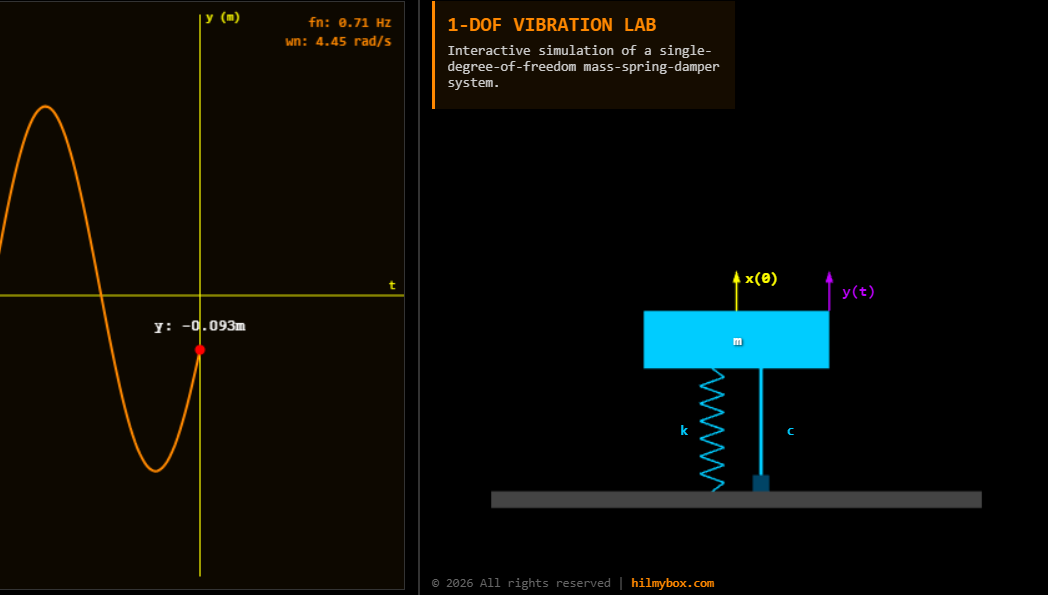
A browser-based vibration simulator with live waveforms and 3D visualisation, built for the moment a student finally sees what damping ratio actually does.
I teach mechanical vibrations. The hardest concept to transfer is the relationship between the parameters of a vibrating system — mass, stiffness, damping — and the behaviour it produces. Students memorise the formulas. They can compute natural frequency, damping ratio, response amplitude. They cannot, until they see it move, picture what an underdamped system looks like compared to a critically-damped one.
The traditional way to teach this is with matplotlib plots stitched together in MATLAB and projected from a laptop. The plots are correct. They are not interactive. A student watching a static graph cannot move the damping slider and watch the curve change shape.
This is the SDOF vibration lab I built so they could.
Try it here — runs in any modern browser.
Who this is for
The audience is mechanical engineering students learning vibration theory, lecturers preparing teaching material, and self-learners working through Rao or Inman. Anyone whose intuition about damped harmonic motion needs a visual scaffold before the math will stick.
How it works
You see a 3D scene with a mass, a spring, and a damper — laid out the way the textbook draws them. Three sliders let you change the mass, the spring stiffness, and the damping coefficient. Hit Start. The mass begins to oscillate, the spring stretches and compresses in real time, and a live waveform plot at the side records the displacement against time.
Adjust the damping while it's running, and the waveform changes shape immediately. Too little damping and the oscillation runs for hundreds of cycles. Critical damping and the mass returns to rest without overshoot. Overdamping and it crawls slowly back to equilibrium. The natural frequency value updates in the panel as you change parameters, so students can correlate the number on the screen with the behaviour they're seeing.
The core idea
The principle is parameters become behaviour, in real time. The whole pedagogical point of a vibration lab is the connection between abstract numbers and observed motion. A textbook can describe that connection. A static plot can show one instance of it. Only an interactive simulation lets the student manipulate the cause and watch the effect, which is how intuition actually forms.
The implementation supports that goal without getting in the way. The physics engine integrates the equation of motion every frame. The 3D scene uses a schematic, technical style — orthographic camera, clean components — so the visual is readable rather than decorative. The waveform plot uses a rolling buffer of three hundred points, so the live trace stays smooth even on slower devices.
The moment damping ratio becomes intuitive
The reason for building this is a moment that happens when a student finally sees what damping ratio means. They've computed the value for an assignment. They know it's a dimensionless number between zero and infinity. They can recite the boundaries: zero is undamped, one is critical, greater than one is overdamped. None of that prepared them for the moment when they drag the slider through those values and watch the same mass behave in three completely different ways.
That moment is what vibration teaching is for. The lab is built to make it happen on demand.
What this is
A single-degree-of-freedom vibration simulator in the browser. Real physics, real-time response, interactive parameters. Free, no account, runs on any modern device. Built for the moment the equation becomes an intuition.
Coming next
A tutorial article and YouTube video are in production: how this lab was built with AI coding agents, including the physics integration loop, the live waveform rendering, and the 3D scene setup. Subscribe for when it ships.