Linkage Lab: Precision Kinematics Simulator
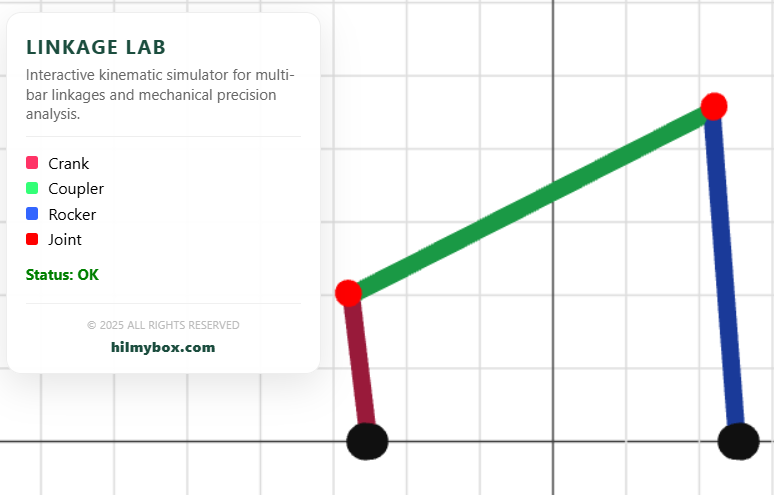
A high-performance interactive environment for simulating multi-bar linkages, piston-crank mechanisms, and mechanical engineering analysis.
Click here to access.
1. The Core Engine
The logic is driven by a custom Kinematic Solver integrated into a standard animation loop.
- State-Based Simulation: The engine maintains a global
state.timevariable. This "virtual clock" drives the input crank's rotation, which then propagates through the entire mechanical chain. - Procedural Geometry: The linkage bars are not static models. The engine dynamically scales, rotates, and repositions
CylinderGeometrymeshes based on the lengths and angles calculated in the current frame. - Integrity Watchdog: A background monitor (
_chk_sys) runs every 2 seconds. It verifies the presence and visibility of the attribution footer. If the engine detects that its branding has been removed or hidden via CSS, it trips a safety flag (_sys_active = false), effectively "freezing" the mathematical solver and clearing the 3D viewport.
2. Rendering Technology
The visualization uses WebGL via Three.js to provide a clean, technical blueprint aesthetic.
- Immediate-Mode Scene Updates: In every frame, the engine performs a "solve" cycle before the render call. It updates the positions of
jointMarkers(spheres) andlinks(cylinders) to ensure zero-latency visual feedback of the mechanical motion. - Orthographic Alignment: While using a
PerspectiveCamera, the objects are primarily manipulated on a 2D plane (XY). The use of aGridHelperrotated by pi/2 provides a spatial reference system typical of CAD (Computer-Aided Design) software. - Materials and Lighting: It uses
MeshStandardMaterialwithAmbientLightto achieve flat, clear colors. This ensures that the mechanical parts (Crank, Coupler, Rocker) are easily distinguishable for analysis.
3. Mathematical Tools
The "Precision Kinematics" aspect of the lab is achieved through Trigonometric Constraint Solving and Circle-Circle Intersection algorithms.
- Circle-Circle Intersection: For the Crank-Rocker mode, the engine determines the position of the output joint by finding where the coupler circle and the rocker circle intersect.The code solves the distance $d$ between joints and uses the Law of Cosines-derived logic:
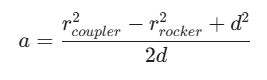
- Boundary Condition Analysis: The solver checks for "Limit Reached" states. If the required distance d exceeds the combined length of the remaining bars (d > L1 + L2), the math identifies a mechanical lock and halts the simulation to prevent graphical "snapping."
- Vector Calculus: The Slider-Crank (Piston) mode uses the Pythagorean theorem to calculate the horizontal displacement of the slider based on the vertical offset (dy) of the crank pin.
4. Front-End Environment
The simulation is hosted in a Modular Web Environment utilizing modern browser standards.
- Import Maps: The lab uses an
importmapto manage external dependencies (Three.jsandlil-gui) without the need for a build step like Webpack. This allows for extremely fast loading and easy portability. - Dynamic HUD (Heads-Up Display): The legend and status indicators are updated via direct DOM manipulation. This creates a "hybrid" interface where high-level data (Status: OK) is rendered in HTML/CSS, while the mechanical simulation is rendered in WebGL.
- Parametric UI: It integrates
lil-guito provide a real-time control deck. Users can manipulate physical dimensions (Crank length, Rocker length) and immediately observe how those changes affect the Grashof condition (the ability of a linkage to complete a full rotation).