A Spectacular 3D Particle Physics Playground
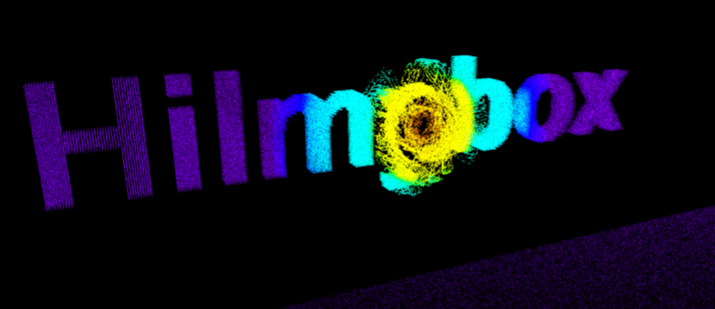
Welcome to Hilmybox, an immersive, high-performance web experience where text and physics collide. This interactive sandbox transforms regular text into a dense cloud of up to 360,000 dynamic particles, allowing you to morph, slice, and swirl them using an array of 12 distinct mathematical physics modes.
Built with a cutting-edge WebGL rendering engine and powered by Three.js, Hilmybox offers a tactile digital environment optimized for both high-end desktops and modern tablets. Whether you are creating a "Galaxy Spiral" with your fingertips or triggering a "Black Hole" with a click, the system responds with real-time heatmap color transitions and a synthesized spatial audio engine that adapts to your every move.
Click here to access.
1. The Core Engine
The simulation is built upon the Three.js library, a high-level cross-browser JavaScript library used to create and display animated 3D computer graphics in a WebGL environment.
- Scene Graph Management: It initializes a
THREE.Scene, aTHREE.PerspectiveCamerafor depth perception, and aWebGLRendererfor hardware acceleration. - Interaction Logic: Uses
OrbitControlsto handle user camera movement (rotation and zoom) andTHREE.Raycasterto translate 2D mouse coordinates into 3D space interactions. - State Control: A custom animation loop (
requestAnimationFrame) serves as the "heartbeat," calculating physics and updating every particle's position and color on every frame.
2. Rendering Technology
The project utilizes Particle System Rendering to manage 120,000 to 360,000 active elements simultaneously.
- BufferGeometry: Instead of individual objects, all particles are stored in a single
THREE.BufferGeometry. This passes arrays of data (positions and colors) directly to the GPU for high-performance rendering. - Additive Blending: The
PointsMaterialusesTHREE.AdditiveBlending, which causes overlapping particles to "brighten" each other, creating a high-energy, glowing effect. - Canvas Texture Extraction: Text is rendered to a hidden 2D
<canvas>element. The code then usesgetImageDatato scan for white pixels, converting the 2D text into a 3D coordinate target for the particles.
3. Mathematical Tools
Complex physics and visual effects are achieved through specific mathematical operations:
- Linear Interpolation (LERP): Used heavily to calculate smooth transitions between colors in the heatmap and to smoothly return particles to their original "text" positions after an interaction.
- Non-Linear Power Scaling: Heatmap colors are calculated using$$t^{0.7}$$, which creates a more dramatic "spectral pop" where the core interaction point stays brighter (white/red) longer before fading into blue.
- Vector Trigonometry: Effects like the Galaxy Spiral or Fluid Vortex rely on
Math.atan2for angles andMath.sin/Math.costo generate rotational forces and wave patterns. - Distance Fields: Every particle calculates its Euclidean distance ($$d = \sqrt{dx^2 + dy^2 + dz^2}$$) from the mouse to determine how much "influence" the active physics effect should have.
4. Front-End Environment
The interface is designed for high-performance web standards and tablet-friendly responsiveness.
- Module-Based Architecture: Uses a
<script type="importmap">to handle ES6 modules, allowing the code to pull modern libraries like Three.js directly from a CDN. - Responsive UI Panel: The "Command Bar" uses CSS Flexbox and Media Queries to shift from a horizontal desktop bar to a more compact, stacked layout for tablets and phones.
- Web Audio API: A dedicated audio context generates real-time synthesized sound (Sine and Triangle waves) that fluctuates based on interaction intensity, rather than relying on pre-recorded audio files.
- Copyright & Persistence: Implements a security interval that periodically checks for the existence of the copyright notice, ensuring the "Hilmybox" attribution remains intact.
Would you like me to explain how any specific physics mode, such as the Black Hole or Vortex, uses these mathematical tools to move the particles?