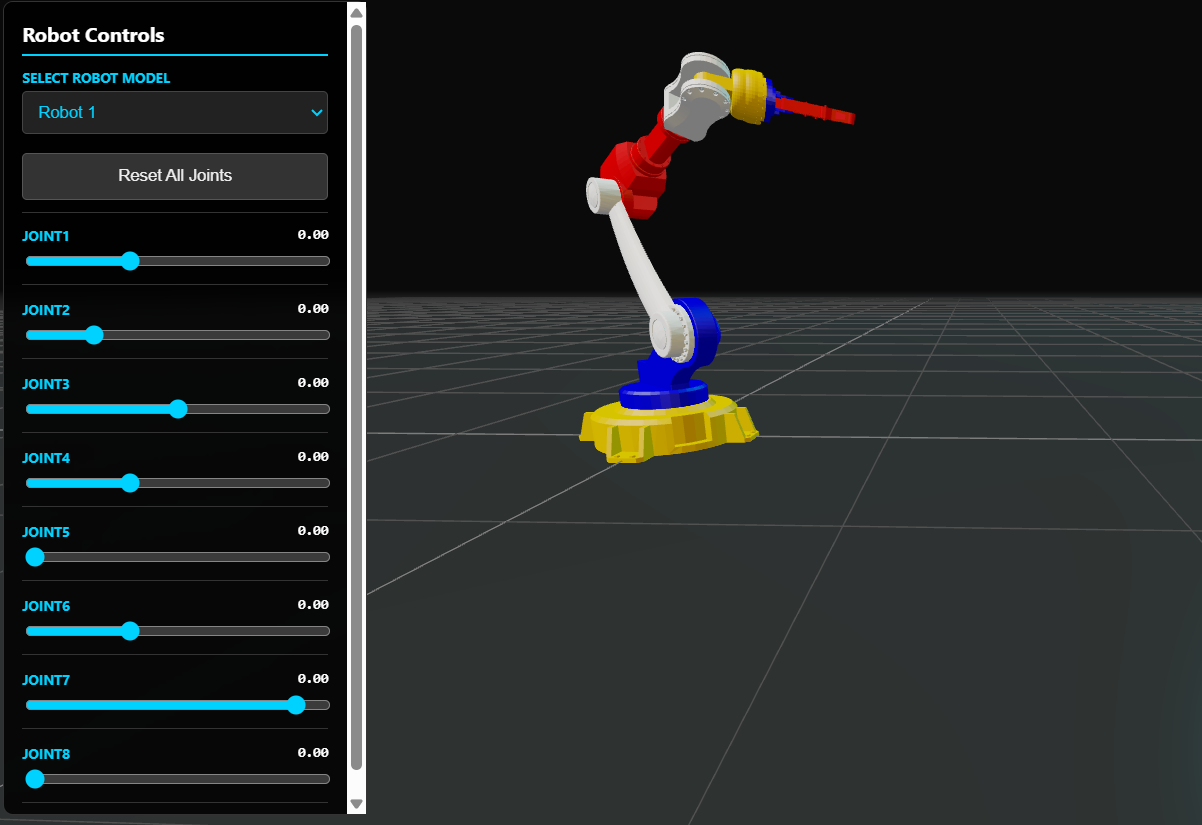
A drag-the-slider, watch-the-arm-move tool for the moment kinematics stops being equations and starts being intuition.
I teach kinematics. Both the forward problem (given joint angles, where does the end effector go?) and the harder inverse problem (given a desired end effector position, what joint angles get us there?). Students figure out the forward case fairly quickly — the math is mechanical, the chain rule of transformations is straightforward to compute on paper. The inverse case is where they struggle. The equations are no longer one-to-one. Solutions multiply. Sometimes they don't exist. Without a visual reference for what the robot is actually doing, the math stays abstract and the wrong intuitions take root.
Most professional robotics software — ROS, RViz, RobotStudio — assumes you're a working robotics engineer with Linux, a development environment, and a target robot to deploy code to. For a student who just wants to see what a URDF file describes and play with the joint angles, those tools are a wall, not a door.
This is the URDF viewer I built so the visualisation step in learning kinematics is no longer the hardest one.
Try it here — runs in any modern browser.
Who this is for
The audience is mechatronics and robotics students learning kinematics for the first time. Anyone trying to develop intuition for how joint angles combine into end effector positions. Engineers inspecting a robot model before integrating it into a design. Lecturers building visual aids for kinematics courses. Anyone teaching the kinematic chain and needing the chain to actually move on screen, so the students can follow what their equations describe.
How it works
You drop a robot folder onto the page — the URDF file plus its associated STL meshes. The viewer parses the kinematic tree, displays the assembled robot, and creates a slider for every non-fixed joint. Move a slider, and the corresponding joint rotates. Watch the end effector follow.
That's forward kinematics, made tactile. Drag a joint variable, see where the end effector lands. Combine multiple joint sliders, and the workspace of the manipulator becomes visible — the set of all reachable positions, traced out by your hand. Joint limits show up as the natural bounds of the slider range, so the student sees the physical constraint, not just an abstract inequality in a textbook.
No accounts. No upload to a server. The files never leave your browser.
The core idea
The principle is that kinematics is taught in the wrong order in most curricula. The math comes first: rotation matrices, Denavit-Hartenberg parameters, homogeneous transformations, Jacobians. The picture of an actual robot moving comes much later, in a lab session, often with a single physical arm shared between twenty students.
The viewer reverses the order. Students see the robot first — assembled, controllable, every joint accessible — and only then dive into the equations describing what they've been watching. Forward kinematics becomes obvious in the first ten seconds. Inverse kinematics, the harder skill, has a visual foundation to build on rather than appearing fully abstract.
The implementation reflects that focus. The URDF parser handles the standard format used across the robotics ecosystem. Coordinate systems convert automatically between the URDF convention (Z-up) and the rendering engine's (Y-up). Joint limits translate directly to slider bounds. The whole tool is one HTML page that works with any standard robot description file.
The moment the kinematic chain becomes obvious
The reason for building this is a moment that happens the first time a student drops in a six-DOF arm. They've been studying the forward kinematics equations on paper. They know how each joint contributes to the end effector position in theory. Then the arm appears on screen, they grab the base joint slider, and watch every link downstream rotate around the base axis. The chain rule of kinematics — each link contributes a transformation to everything below it — clicks. They suddenly understand what they've been computing on paper.
The same moment happens, harder, when they start thinking about the inverse problem. The forward case has given them the feel for what the chain does. The inverse case is then about asking the same chain to land somewhere specific. Having played with forward kinematics first makes inverse kinematics a question of constraint, rather than a wall of unmotivated math.
What this is
A URDF viewer that runs in any browser, accepts any standard robot description, and lets a student manipulate it in real time. No environment to set up. No license to install. Built so the visualisation step in learning forward and inverse kinematics happens first — where it should — instead of last.
Coming next
A tutorial article and YouTube video are in production: how this viewer was built with AI coding agents, including the URDF parser integration, the joint slider mapping, and the coordinate-system conversion. Subscribe for when it ships.