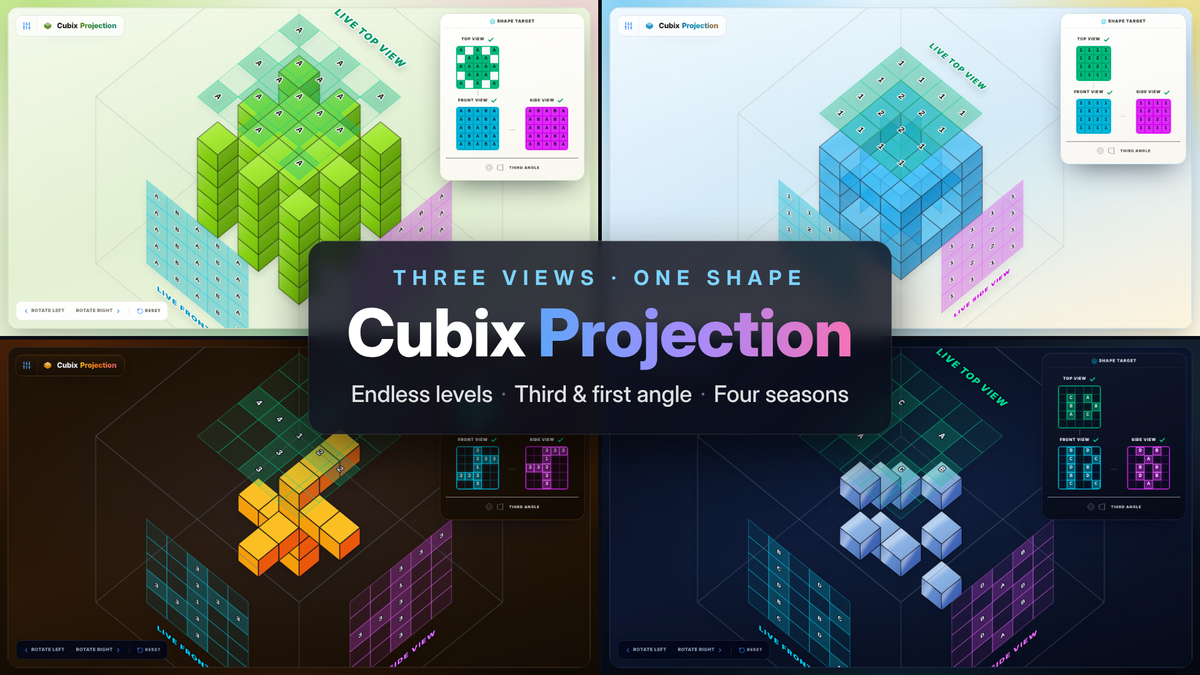
Spatial reasoning sits under engineering, architecture and design. It is also one of the hardest things to teach. On a drawing sheet a student sees a top view, a front view and a side view, three flat drawings, and has to hold one solid object in their head that agrees with all three. A worksheet can't tell you whether the shape you're imagining is right. It just waits until the answer key.
I teach engineering drawing, and I built Cubix Projection to close that gap. It is the puzzle I wanted to give my students: the same three views they meet in class, plus a 3D shape they can turn over in their hands and check against those views at every step.
The puzzle
Every level is one solid made of cubes. You are given only its three orthographic views: Top, Front and Side. Your job is to build a shape inside the glass box whose views match all three.
The key is that the views don't just show a silhouette. Each cell in a blueprint tells you how deep the nearest block sits. That is what makes three flat drawings enough to pin down one exact shape, and it is what turns the game from guessing into reading a drawing.
As you work, the box shows your live projections on its glass walls: your current top, front and side views, right next to the shape. Compare them with the Shape Target panel and you can see exactly which cell is still wrong. When all three views line up, the level is solved.
How you play
- Add or Remove. One switch above the board. In Remove mode, tap any exposed block face to carve it away. In Add mode, tap a floor cell or the face of a block to build outwards.
- Start solid or start empty. Carve the shape out of a full block, or build it up from an empty board.
- Orbit the box. Drag to rotate, pinch or scroll to zoom, hold Shift and drag to pan. Rotate Left, Rotate Right and Reset are always on screen.
- Instant Solve. Stuck on a hard one? Instant Solve shows you the finished shape so you can orbit it and compare it with the views, taking as long as you like.
Drawn the way engineers draw
The target views are laid out as they are on a real drawing sheet. In third angle projection, the Front view sits in the centre, the Top view directly above it and the Side view directly beside it, all lined up. Tap the projection symbol under the views to switch to first angle projection, the convention used across much of Europe and Asia. Students can practise in whichever system their course uses.
110 levels, then endless
The campaign has 110 hand-made levels in four tiers that grow with you:
- Easy: 2×2×2
- Medium: 3×3×3
- Expert: 4×4×4
- God Mode: 5×5×5
Clear a tier to unlock the next one. The first level of every tier is always open, if you want a look at what's coming.
Past level 110, Endless Mode takes over. The puzzles are generated and never run out, and every level number always builds the same shape. Send a level number to a friend and race each other on the same puzzle.
Make it yours
Everything below lives in Preferences:
- Four seasons. Spring and Summer are light palettes. Autumn and Winter are dark.
- Depth notation. Show depth on the blueprints as letters, as numbers (1 is the surface nearest you), or as dice-style pips you can count at a glance.
- Dice skin and block materials. Draw the blocks as dice, and choose a matte, plastic, glass or metal finish.
- Challenge Mode. An optional countdown, sized to each shape: how many taps it needs and how much the blueprints ask you to read. Running out never costs your work. You can take more time, restart the shape, or move on.
Free, private, and yours to keep playing
Cubix Projection runs entirely in your browser. There are no ads, no sign-up and no tracking. Your progress and settings are saved on your own device, so you can close the tab and pick up exactly where you left off.
For teachers and students
Cubix Projection works as a warm-up before an orthographic drawing session, as homework that checks itself, or simply as a way to build the habit of reading three views as one object. The early levels make the idea click. The Expert and God Mode levels will stretch anyone who already draws for a living.