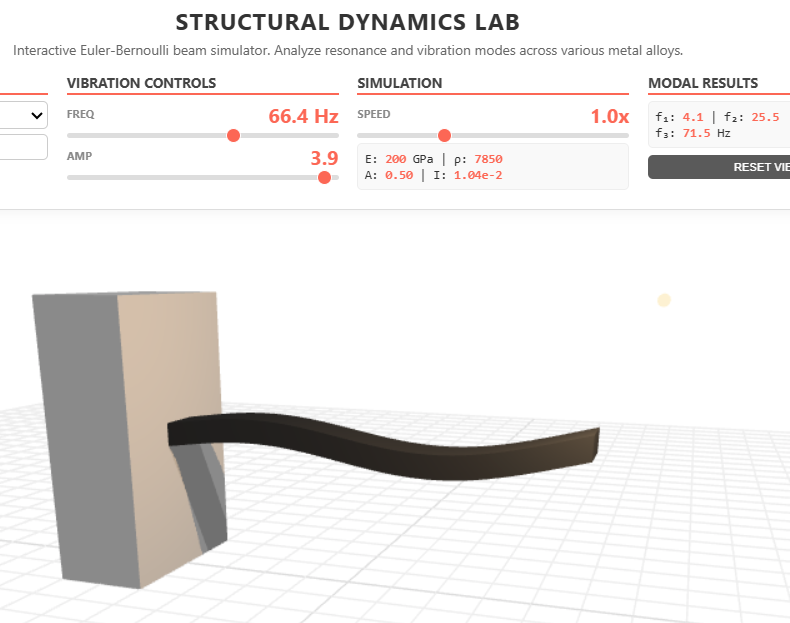
A browser-based cantilever beam simulator that lets students change material and dimensions and watch the mode shapes shift in real time.
Ever wonder why diving boards bounce the way they do?
The answer is modal analysis — the branch of vibration theory that decomposes a structure's behaviour into a small number of natural shapes it "wants" to vibrate in. Every cantilever — a diving board, an aircraft wing, a beam in a building — has its own set of these mode shapes. They depend on the geometry. They depend on the material. They determine which frequencies the structure will amplify catastrophically and which it will quietly absorb.
The math is in every vibrations textbook. The intuition is harder to come by.
This is the cantilever modal analysis tool I built to make the intuition arrive earlier.
Try it here — runs in any modern browser.
Who this is for
The audience is mechanical engineering students learning vibration theory, structural engineers reasoning about resonance, anyone studying fatigue, anyone designing brackets or fixtures, and anyone who has ever wondered why a tuning fork sounds the way it does. Modal analysis turns out to be one of the more universal pieces of mechanics — once you have intuition for it, half of dynamics becomes legible.
How it works
You see a cantilever beam attached to a wall. Pick a material from the dropdown — steel, aluminium, titanium, brass, copper. Adjust the length, width, and thickness with sliders. The tool computes the first three natural frequencies of the beam from the geometry and the material's Young's modulus and density. A slider lets you sweep through the frequency range, and the beam visibly bends in the mode shape closest to whatever frequency you've chosen.
A panel beside the beam shows the computed values in real time — cross-sectional area, second moment of area, the three natural frequencies. Change the material and watch them shift. Make the beam longer and watch the frequencies drop. Make it thicker and watch them rise.
The core idea
The principle is that modal analysis is taught backwards in most curricula. The math comes first — Euler-Bernoulli beam theory, separation of variables, eigenvalue problems, boundary conditions. Then, at the end of the chapter, a small picture of the first three mode shapes. By that point most students have stopped caring about the picture.
The tool reverses the order. Students see the mode shapes first — animated, parametric, responsive to material choices they understand from everyday life. They see that a steel beam bends differently from an aluminium one at the same dimensions. They see that the first mode is the slow, big sway, and the third is the quick, three-node ripple. The math comes later, applied to a phenomenon they've already developed intuition for.
The implementation supports that goal. The beam visibly bends in real time using a GPU-accelerated displacement shader, which makes the animation smooth even at high mode numbers. The material library uses real values from engineering handbooks. The geometry sliders cover the range from a thin steel ruler to a stiff aluminium bar. Everything updates immediately.
The moment resonance becomes obvious
The reason for building this is a moment that happens when a student first sweeps the frequency slider through a natural frequency. Far from any mode, the beam barely moves. Closer, it starts to wobble. At the resonance, it suddenly bends to its full amplitude in the corresponding mode shape. Past it, it settles down again. The peak is sharp. The student understands, viscerally, why resonance matters: it's a narrow window where a small input produces an enormous response.
That intuition is what fatigue engineers carry. What bridge designers carry. What anyone who has ever watched the Tacoma Narrows footage carries. The lab is built to give it to students sooner.
What this is
A modal analysis simulator for cantilever beams. Real physics, real material data, real-time response. Built so the visualisation step in learning vibration theory becomes the first step rather than the last.
Coming next
A tutorial article and YouTube video are in production: how this tool was built with AI coding agents, including the GPU shader displacement, the eigenvalue solver, and the material library. Subscribe for when it ships.