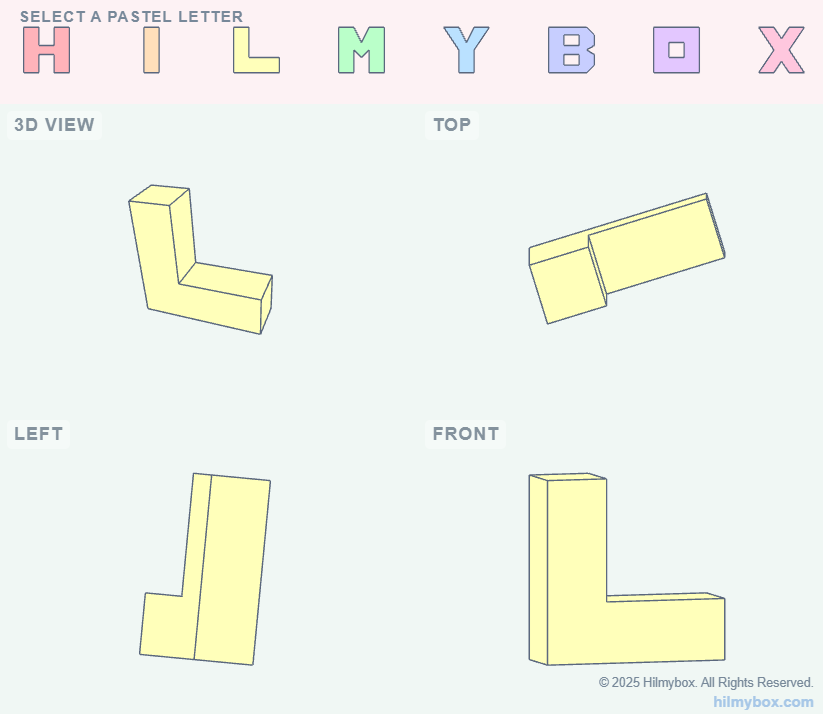
An early experiment that became the seed of Umbra — a quad-view dashboard for showing orthographic projections of a 3D word.
This was one of the first 3D experiments on hilmybox.com. I wanted to see if a browser could host the kind of quad-view orthographic display that mechanical engineers use every day in their CAD packages — top, front, side, and perspective, all updating live as a 3D object rotated in space.
I extruded the letters of "HILMYBOX" into 3D blocks and arranged them in a viewport with three orthographic cameras and one perspective. The result was a small interactive demo, more design study than tool, that confirmed two things at once: browsers could do the four-view layout well, and there was a more interesting question hiding behind it.
That question — what if instead of showing all four views simultaneously, students had to reconstruct the 3D object from just the three orthographic ones? — became Umbra, the shadow puzzle published months later. This piece is where the idea started. Click here to access.
What it is
A short, exploratory dashboard. Three orthographic views and one perspective, rendered live in the browser, showcasing a 3D extrusion of the site's name. No tutorial, no game, just a study.
What stayed with me
The realisation that multi-view layout is a solved problem in the browser. Once that was clear, the harder questions about projection pedagogy could be asked. The drawing-class problem I'd been thinking about for years — the inverse projection problem, where students struggle to reconstruct a 3D object from its views — had a viable implementation path.
This experiment was the foundation that Umbra and Lattice both stand on. It earns its place in the journey not by being a finished tool, but by being where the path started.
Part of the early experiments — when I was still mapping out what was possible in the browser before deciding what was worth building.