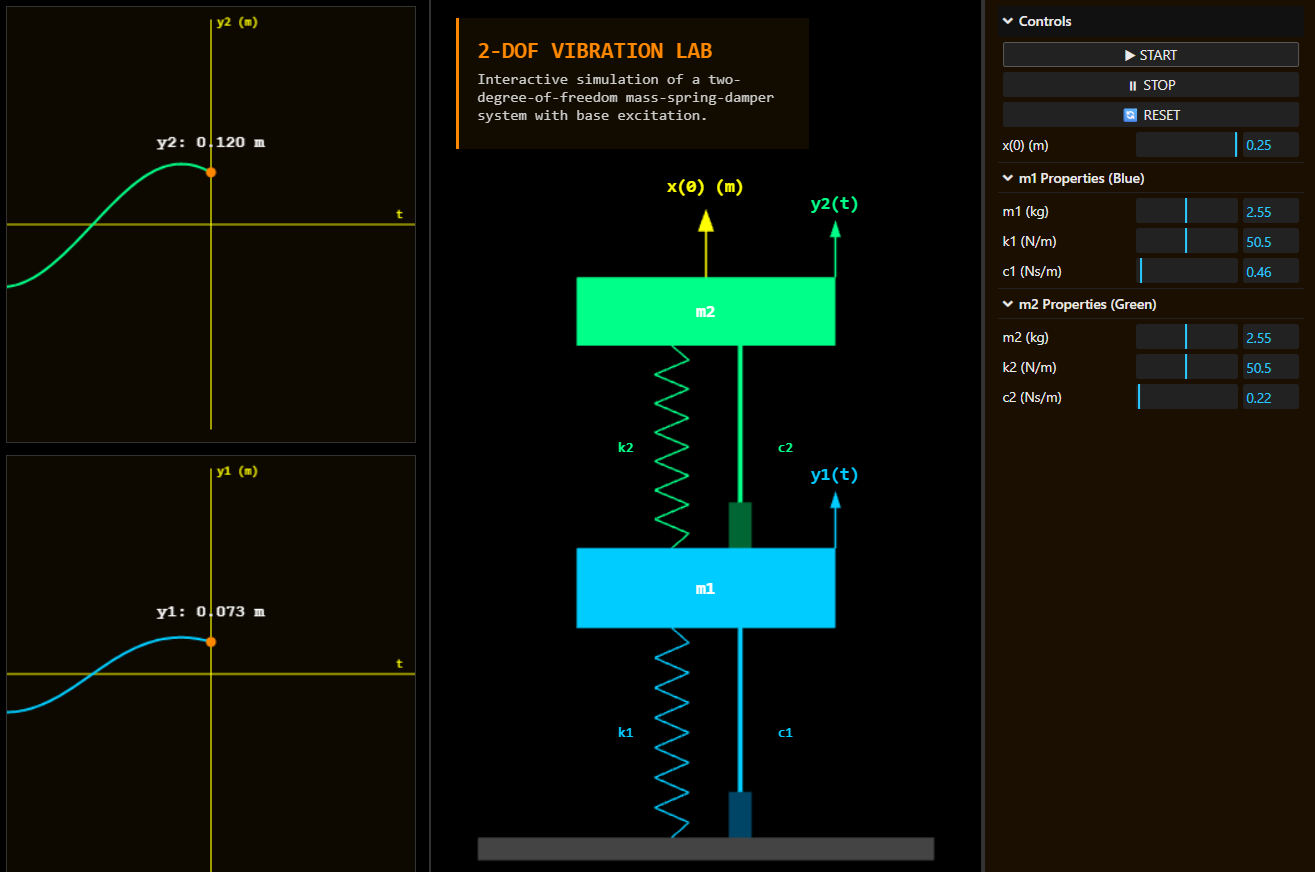
The companion to the SDOF lab, but with two masses that talk to each other — for the moment coupled motion stops being mysterious.
After building the SDOF vibration lab, the obvious next step was the system most students struggle with even harder: the two-degree-of-freedom case. Two masses, two springs, two dampers, coupled together — and suddenly the textbook stops being friendly. The equations are matrices now. The natural frequencies aren't single numbers but the eigenvalues of those matrices. The mode shapes are vectors. The behaviour, when one mass moves, ripples into the other through the coupling spring.
Students learn to compute these things. They struggle to picture them.
The 2-DOF vibration lab is the companion to the SDOF one, built for the same reason: so the behaviour becomes visible.
Try it here — runs in any modern browser.
Who this is for
The audience is mechanical engineering students moving from single-degree to multi-degree systems for the first time. Anyone studying earthquake response of multi-storey buildings. Anyone designing tuned mass dampers, which is exactly a 2-DOF system. Lecturers building intuition for coupled oscillation. Engineers who learned this decades ago and want a quick visual refresher.
How it works
You see two masses, stacked vertically, each connected to the floor by a spring and damper, and connected to each other by another spring and damper between them. Six sliders control the parameters — masses, spring constants, damping coefficients for each pair. Hit Start. Both masses begin to oscillate.
The motion is coupled. Push one mass, and the spring between them transfers energy to the other. Adjust the parameters, and the system's two natural frequencies shift. Hit the right ratio and you get a mode shape — a pattern where both masses oscillate at the same frequency, either in phase (low mode) or out of phase (high mode).
A live graph traces the displacement of both masses against time, so the phase relationship is visible. The size of the rendered mass changes as you adjust its parameter, giving you immediate visual feedback on "heaviness."
The core idea
The principle is that coupling is invisible until you see it move. The matrices in the textbook describe coupling. The eigenvalues describe its consequences. None of that, in any quantity, builds intuition the way watching mass A start to oscillate after mass B is disturbed builds it. The energy transfer between coupled systems is something you have to see before it becomes part of your engineering instinct.
The lab makes that motion the centre of the experience. The 3D scene is utilitarian, not artistic — schematic components, clean lighting, dimension labels that follow the masses as they move. The graph is a single canvas with a rolling history of both signals. Sliders update everything in real time. Reset returns to defaults. No tutorials, no menus, no anything between the student and the motion.
The moment coupling becomes obvious
The reason for building this is a moment that happens when a student tunes the parameters to deliberately produce a beat pattern. They've computed beating mathematically — two close frequencies producing a slow envelope. They've never watched it. With the right slider settings, the lab produces beating you can see: one mass oscillating with growing amplitude while the other shrinks, then the energy flows back the other way, over and over. Beat patterns in fluid dynamics, in electrical circuits, in coupled pendulums — all the same phenomenon. The 2-DOF lab makes it visible in twenty seconds.
What this is
A coupled mass-spring-damper simulator in the browser. Two masses, real physics, real-time. The companion to the SDOF lab — together they cover the foundational cases of vibration theory. Free, no account.
Coming next
A tutorial article and YouTube video are in production: how this lab was built with AI coding agents, including the coupled-equation solver and the procedural spring geometry. Subscribe for when it ships.